
Or try one of the following: 詹姆斯.com, adult swim, Afterdawn, Ajaxian, Andy Budd, Ask a Ninja, AtomEnabled.org, BBC News, BBC Arabic, BBC China, BBC Russia, Brent Simmons, Channel Frederator, CNN, Digg, Diggnation, Flickr, Google News, Google Video, Harvard Law, Hebrew Language, InfoWorld, iTunes, Japanese Language, Korean Language, mir.aculo.us, Movie Trailers, Newspond, Nick Bradbury, OK/Cancel, OS News, Phil Ringnalda, Photoshop Videocast, reddit, Romanian Language, Russian Language, Ryan Parman, Traditional Chinese Language, Technorati, Tim Bray, TUAW, TVgasm, UNEASYsilence, Web 2.0 Show, Windows Vista Blog, XKCD, Yahoo! News, You Tube, Zeldman
InfoWorld
Technology insight for the enterpriseTeradata aims to make agentic execution of multistep data work more efficient 24 Sep 2026, 7:26 am
Teradata is adding a context engine, an execution layer, and reusable agent skills to Tera, its AI-powered workspace for enterprise data and AI tasks, in order to make agentic execution of multistep workflows more efficient. Tera was initially introduced in May as part of Teradata’s Autonomous Knowledge Platform.
The new additions are designed to cut unnecessary model and tool calls while preserving business context and automatically matching each task with the right data, tools, models, and skills, helping enterprises control inference costs as agentic workloads scale, Teradata said in a statement.
The new execution layer, Tera Harness, determines how agents approach tasks and how workflows are routed, while the Tera Context Engine adds the business context needed to guide those decisions.
In order to reduce the computation needed to complete a task or workflow, the Harness creates an execution plan before sending work to an LLM, batches independent tasks, and drops model or tool calls that do not advance the task, the company said. It applies 84 execution patterns before inference and limits how many steps a workflow can run based on its progress, reducing repeated LLM reasoning and the token and infrastructure costs associated with unproductive agent loops, it added.
According to Teradata’s own evaluations on the SWE-bench Pro benchmark, with these new capabilities Tera used 73% fewer tokens than Claude Code, completed tasks 42% faster, and incurred 58% lower total cost while achieving higher task completion rates, while running the same Opus 5 model.
Managing the cost of agentic workloads
That focus on the economics of agent execution could become increasingly important for CIOs trying to scale agentic workloads within their allocated AI budgets, analysts said.
“Tera Harness is attacking the part of agentic AI that enterprises are only now discovering hurts, which is that an agent left to reason its way through every step will happily burn tokens on loops that never move the task forward. Even a small reduction in calls per workflow can become meaningful at scale,” said Ashish Chaturvedi, executive research leader at HFS Research.
For enterprises looking to control agent costs, cutting unnecessary model calls and the reasoning tokens they consume could be more practical than simply choosing a cheaper model, said Stephanie Walter, practice lead of AI stack at HyperFrame Research, as it reduces the amount of inference an agent needs rather than simply reducing the cost of each inference.
Beyond reducing spend, the same ability to constrain how an agent executes a task can also help CIOs budget for their agentic workloads better, according to Advait Patel, senior site reliability engineer at Broadcom.
“Right now, agentic costs are hard to forecast because the same task can take five calls one day and fifty the next. A harness that plans first makes costs more consistent, which makes budgeting and scaling decisions easier,” Patel said.
That predictability could also reduce the amount of agent-optimization work developers have to build and maintain themselves.
“Planning before invoking an LLM, batching independent steps, and dropping calls that do not advance a task are established engineering practices, but having the platform apply them by default means individual development teams do not have to implement and continuously tune those controls for every agent workflow, Patel pointed out.
Tera’s cost controls come with tradeoffs
However, Tera’s cost-optimized approach is not without tradeoffs, and enterprise teams will need to account for the constraints that can come with more tightly controlled agent execution.
“The catch is that pruning inference calls to an LLM is a judgment call. If the Harness drops a step it considers unnecessary and that step turns out to matter, the enterprise saves money but gets a worse answer. Enterprises will therefore need to verify the results carefully,” Patel said.
Walter said that, in turn, could shift some of the work for developers from directing individual steps such as deciding which tools to invoke and how tasks should be sequenced to defining what a correct outcome looks like and reviewing whether an agent has achieved it. Teams will also need to maintain the skills, instructions, and guardrails that determine how agents operate in production, creating a new layer of engineering work even as the platform takes on more of the execution itself, she added.
CIOs too will need to exercise caution, particularly around the promised cost efficiencies, said Robert Kramer, managing partner at KramerERP. “Teradata’s benchmark results should not be treated as equivalent to enterprise total cost of ownership,” he said. “Enterprises should instead measure the cost of completing a business task, including model usage, data compute, tool calls, retries, orchestration, and the human effort required to review the result.”
And the cost of running agentic workflows is not the only consideration for CIOs, said Walter: The more enterprises rely on Tera’s architecture to manage context, execution, and reusable skills, the more those capabilities could become embedded in their workflows, raising a separate question around how easily those workflows could be moved to another platform.
Early adopters
Those tradeoffs and Teradata’s current install base are also likely to shape which enterprises choose to adopt Tera, and how.
“The most likely early adopters are existing Teradata customers with complex, governed data environments and workflows spanning analytics, data engineering, and AI. For those enterprises, Tera represents a logical expansion of an environment they already use,” Walter said. “Winning customers that have standardized on Snowflake or Databricks will be harder because the agents are not a good enough reason for lift and shift.”
Teradata plans to make the new context engine, execution layer, and reusable agent skills generally available by December.
This article first appeared on CIO.
Managing the life cycle of AI agents at scale 24 Sep 2026, 2:00 am
There’s a new reality emerging for development teams: existing software delivery practices don’t translate cleanly to agentic AI systems. Practices built around deterministic execution paths and well-defined application behaviors are no longer sufficient when the software itself can make decisions about how to accomplish a task.
The main difference is that agents exhibit non-deterministic, context-dependent behavior. In contrast to traditional applications, where behavior is determined by code and configuration, agents can make dynamic decisions about how to tackle a task, which tools to use, and what actions to carry out. Their behavior is influenced by models, prompts, tools, data, memory, and the runtime context.
These new requirements now apply to how we design, evaluate, observe, govern, and run software, since conventional software development life cycles were not intended to meet them. This situation creates the need for an agent development life cycle (ADLC).
ADLC extends existing software development practices by incorporating agent-specific considerations such as continuous evaluation, agent observability, agent identity, tool access, and governance at every stage of the process, from agent definition and design through development, deployment, and production operation.
Let’s look at some key aspects of ADLC and how they address the unique requirements of building and operating agents.
Start by defining the agent
Before you start writing any code, you must clearly define the problem the agent is supposed to solve, the scope and boundaries of that problem, and the criteria for judging success.
For example, a hotel booking agent could help users find appropriate hotels, compare options, and make, modify, or cancel reservations. Its scope should also clearly define what the agent is not responsible for.
From this scope, establish measurable success criteria. For instance, the agent should successfully handle 95% of valid booking requests without human intervention and must never confirm a booking without first receiving explicit user approval.
This gives the team a clear definition of the agent’s objectives and boundaries before deciding how to build it.
Design for agentic behavior
First, decide whether the use case really needs an agent; if a deterministic workflow can solve the problem, an agent may add unnecessary complexity.
When agentic behavior is needed, decide on the right framework, architecture, and patterns; for instance, whether to use a single agent, one that has a supervisor along with specialized agents, or some other kind of orchestration pattern.
You need to determine the tools and data the agent will require to carry out its defined scope; this should cover not only the tools the agent is allowed to use but also the limits on the operations it is permitted to carry out. For instance, a hotel booking agent would need access to tools that check availability and make reservations, but should not be given the authority to alter room prices or provide refunds.
The design should also specify how the agent will handle context and memory, and how its behavior will be evaluated. The evaluation criteria and datasets should be defined, together with the acceptable limits for quality, safety, latency, cost, and any other relevant factors.
The design decisions form the blueprint for implementation, after which the agent can be developed using the selected framework, with evaluation carried out throughout the development process against the success criteria set in the “define” phase described above.
Evaluation goes beyond the final answer
Evaluation plays a crucial role in agent development and continues throughout the agent’s life cycle. It can occur during the development phase using reference datasets and can also be carried out continuously in live or production-like environments.
Evaluators assess various aspects of the agent’s behavior according to established criteria, using deterministic rules, model-based judgment, or domain-specific logic.
Unlike traditional testing, agent evaluation cannot be limited to the final output. Because agents make decisions and take actions during the process, the path taken to reach the outcome is as important as the outcome itself. An agent may achieve the expected outcome while taking an inefficient path or performing actions it is not authorized to perform.
Therefore, it is necessary to consider various dimensions such as accuracy, helpfulness, safety, tool use, error recovery, efficiency, reasoning quality, and tone. Different dimensions can be evaluated by different evaluators, which carry out specific checks to assess particular aspects of quality. By using multiple evaluators, you create an overall quality profile that includes both the output and the behavior that led to it.
In a robotics use case we worked on at WSO2, the agent was controlling a robot and was tasked with finding a trash bin. This involved moving the robot around, capturing images, and checking those images for a trash bin. The agent eventually found the bin, but received a low path-efficiency rating. The evaluator regarded the repeated rotations and image captures as inefficient, even though these actions were necessary for the agent to understand its physical environment. The problem wasn’t with the agent but with the evaluator; to address this, we developed a custom evaluator that accounted for the environment and constraints, then used it to improve the agent’s behavior.
The main takeaway is that it should not be enough to say “it works”; you must establish criteria for good agent behavior in the context of the environment in which the agent operates.
Observability for agentic systems
To understand how an agent behaves, you need visibility into what happens when it is executed, both during development and after it has been put into use. Traditional observability provides visibility into applications through logs, metrics, and traces. Yet agentic systems introduce new types of interactions and execution patterns that have to be understood; for example, those involving model interactions, tool calls, retrievals, interactions between agents, and the execution paths that the agents follow in order to carry out a task.
Current observability foundations, such as distributed tracing, remain highly relevant to agentic systems. The problem is not tracing per se, but the absence of a common set of semantics for describing behavior specific to individual agents. Although traditional tracing is well adapted to depicting services, requests, database calls, and other application operations, concepts like model interactions, tool calls, agent handoffs, and agent execution paths need further semantics.
Without common semantics, different agent frameworks will represent the same operations differently. For instance, how a tool invocation is captured will vary by framework, making it difficult to consistently understand agent behavior in a heterogeneous environment.
The gap is narrowing as standards like OpenTelemetry develop common semantic conventions for agent-specific interactions. These conventions provide a consistent basis for observability tools to collect, analyze, and visualize agent behavior across frameworks.
Enforcing agent boundaries
Although observability lets us see what an agent is doing, visibility alone is not sufficient; the boundaries set during the design phase must also be enforced at run time.
When agents use enterprise systems via various tools, such as those available through Model Context Protocol (MCP) servers, it is necessary to know which agent is making the request and what actions that agent is permitted to carry out. This, in turn, creates the need for agent identities and roles.
Access-control policies can turn the boundaries set up during the design phase into permissions that specify the tools and operations an agent can call. The policies can then be enforced at the control points between the agent and the tools it accesses.
The hotel booking agent is designed to search for available rooms and make reservations, but it cannot alter room prices or provide refunds. At run time, these limitations are enforced by permitting the relevant search and booking functions while refusing any requests to change the price or issue a refund.
This ensures the boundaries set during the design phase are maintained while the agent operates.
Governing agent-LLM interactions
You need to govern how agents interact with large language models throughout their life cycle. This includes managing model usage and cost and applying the necessary safety and security policies.
Agentic workflows may involve several model calls as the agent plans, uses tools, evaluates results, and iterates to reach an outcome. You need to track model and token usage, set budgets, and enforce limits to keep usage within acceptable levels.
You also need to address safety and security. You can apply guardrails to model inputs and outputs to detect or prevent issues such as exposure of personally identifiable information, harmful content, prompt injection, and other policy violations. You can also define which models an agent can access and under what conditions.
Together, these mechanisms keep agent-LLM interactions within the security, safety, cost, and operational limits set by the organization.
Scaling ADLC across the enterprise
As agent adoption grows, applying ADLC capabilities consistently becomes increasingly difficult. Different teams are likely to develop and run agents using a variety of frameworks, models, tools, and environments. As the number of agents and teams increases, maintaining consistency across them becomes harder.
Evaluation, observability, identity and access, guardrails, budgets, and runtime policies could be handled with different tools and approaches, leading to fragmentation and redundant effort. This makes it difficult to apply common policies, maintain consistent controls, and gain a unified view of agents across the organization.
That’s where an agent control plane proves its value. It provides a standard layer to apply and manage these capabilities consistently across the entire agent portfolio, while still enabling teams to develop agents using the frameworks, models, and tools best suited to their specific use cases.
Operationalizing ADLC with an agent control plane
An agent control plane provides a common way to apply and manage ADLC capabilities consistently throughout the agent life cycle.
Organizations can register each agent, along with its purpose, owner, version, tools, and dependencies, to provide visibility across the agent portfolio. They can integrate evaluation requirements into CI/CD pipelines and use quality, safety, and domain-specific thresholds as gates before promoting agents between environments.
At run time, identity and access policies can control which tools and enterprise systems an agent can access. Guardrails, budgets, and usage limits can govern its interactions with LLMs. Traces and metrics provide insight into agent behavior, while online evaluations continuously evaluate whether agents continue to meet expected quality and safety standards.
These capabilities provide a consistent way to manage agents without forcing development teams to standardize on a particular agent framework, model, or environment.
The life cycle does not end when an agent reaches production. Runtime behavior provides information that teams can use to improve the next version of the agent.
When an agent’s behavior changes or falls below expected thresholds, teams can use traces and evaluation results to understand what happened. They can then improve the agent, adjust policies or permissions, update evaluations, and deploy a new version.
This creates a continuous life cycle in which teams define, design, evaluate, deploy, observe, and govern agents, with what they learn during operation feeding back into the next iteration.
The agent control plane provides the common foundation needed to apply these ADLC capabilities consistently as agent adoption scales across the enterprise.
Establishing the foundation early
Establishing this common foundation early ensures that agents are managed consistently throughout their life cycle, from design and development through to production, with the necessary security controls and visibility in place. This foundation is much easier to establish early than to retrofit later. As agent adoption grows, maintaining consistent controls becomes harder, especially as agents gain access to more models, tools, and enterprise systems while operating within defined boundaries.
Organizations early in their agent journey should establish this common foundation before fragmentation and security risks become harder to manage. For organizations already experiencing inconsistent practices across teams or struggling to maintain control and visibility over agents, these are strong signals that they need an agent control plane.
—
New Tech Forum provides a venue for technology leaders—including vendors and other outside contributors—to explore and discuss emerging enterprise technology in unprecedented depth and breadth. The selection is subjective, based on our pick of the technologies we believe to be important and of greatest interest to InfoWorld readers. InfoWorld does not accept marketing collateral for publication and reserves the right to edit all contributed content. Send all inquiries to doug_dineley@foundryco.com.
Apple touts simpler and clearer code with Swift 6.4 23 Sep 2026, 3:59 pm
Apple has released Swift 6.4, an upgrade to the programming language that brings improvements across the board including core library APIs, builds, debugging, interoperability with other platforms, and performance.
Swift 6.4 was announced September 15. “Swift aims to be a great choice across the stack, from apps and servers to systems code, embedded devices, and the browser. This release deepens that support, and makes everyday code easier to write,” Apple’s Joe Heck and Holly Borla wrote in the announcement. They listed the following highlights of the release:
- Swift Build is now the default in Swift Package Manager, so your projects build the same way on Linux, macOS, and Windows.
- Subprocess reaches 1.0, a stable, cross-platform way to run and interact with other programs from Swift, from command-line tools to streaming processes.
- Interoperability reaches further, with Swift’s Span now bridging directly with C++20’s
std::span, and Swift/Java interop extending its async and callback support. - Swift runs faster in the browser, with WebAssembly bridging through JavaScript kit up to 40 times faster, and the Wasm SDK available directly from Swift.org.
- Embedded Swift grows more capable, with support for existential types and richer error handling for microcontroller-class targets.
- Performance improves while maintaining memory safety, with new array types that hold non-copyable elements without copy-on-write overhead, and the new
Iterableprotocol for iterating without copies.
Swift 6.4 also completes a multi-release overhaul of how the compiler tracks Swift modules in debug info. LLDB now imports modules through precise dependency tracking instead of by-name lookups. Debug builds on Linux and Windows, and dSYM bundles on Darwin, shrink significantly because binary Swift modules are no longer embedded in them. Swift 6.4 also makes it easier to avoid unnecessary copies of data while staying memory-safe, extending earlier work on Span, non-copyable types, and InlineArray, according to the announcement.
JetBrains unveils JetBrains Air for agentic software development 23 Sep 2026, 10:08 am
JetBrains on September 22 announced JetBrains Air, an open system of products for managing AI-powered software development workflows across developers, teams, and organizations. JetBrains Air includes products that are available today and others that will be introduced as the system develops, JetBrains said.
“For 26 years, we have focused primarily on the individual developer workbench. Now, we are building for the wider system through which agentic work is initiated, executed, coordinated, reviewed, and governed,” JetBrains CEO Kirill Skrygan said in a blog post announcing the initiative. Skrygan said the product suite would include:
- Air in JetBrains IDEs – a complete agentic development experience for directing and orchestrating agents and verifying their work inside JetBrains IDEs.
- Air Teams – a new way to coordinate and automate software-delivery workflows involving developers and autonomous agents.
- Air Governance (formerly JetBrains Central) – organizational policy, visibility, auditability, cost management, and accountability for AI-assisted and agent-driven development.
JetBrains Air will develop through a rolling series of releases. Over time, the product suite will extend further into mobile and remote experiences, allowing developers to initiate, monitor, review, and continue agentic work as it moves between environments, Skrygan said. The company will also bring JetBrains’ intelligence into more agentic workflows, he said, including richer context from code, architecture, repositories, runtime behavior, and organizational knowledge, and better ways to route work between developers, models, agents, and services.
OpenAI, Anthropic cut AI model costs as price-performance race intensifies 23 Sep 2026, 8:21 am
Enterprises can now buy frontier AI for far less per token after OpenAI and Anthropic cut prices on their newest models on Tuesday.
OpenAI released GPT-6 Sol and GPT-6 Luna with per-token costs half those of their GPT-5.6 predecessors.
“These models help distribute the benefits of that intelligence by advancing the frontier on cost efficiency,” OpenAI said in a blog post about the launch. “Improvements in caching and inference let us serve these models at lower cost, and we’re passing those savings directly on… by reducing API prices for Sol and Luna by 50%,” it said.
Anthropic, meanwhile, launched Claude Opus 5.5 with token prices 20% below those of Opus 5, and claimed that this, with the model’s lower compute requirements and reduced token usage, meant additional savings for enterprises: “It performs at the level of Claude Fable 5.1 on most work and costs 40% less to run than Opus 5,” the company announced on Opus 5.5’s web page.
Focus shifts to cost-performance
Rather than touting raw performance, as they did with the launch of their flagship models GPT 6 Astra and Claude Fable 5.1, the companies emphasized the value for money of their new models.
But analysts say the moves are about more than the lower prices.
AI vendors are increasingly competing on efficiency, said Forrester VP and principal analyst Charlie Dai.
“Frontier AI is entering a prolonged price-performance race driven primarily by inference efficiency gains, better caching, and model optimization, and it’s also intensified by competitive pressure as capabilities converge,” Dai said.
Providers are lowering costs to “expand enterprise adoption and stimulate higher-volume production usage.”
The economics of on-premises AI in question
Lower API costs improve the economics of consuming AI via cloud platforms, particularly for workloads such as coding agents and enterprise automation.
However, there’s still a case for private or hybrid deployments, Dai said, citing data sovereignty, security, and intellectual property requirements.
“Lower inference costs improve the economics of API consumption, but they do not eliminate demand for private and hybrid AI,” he said; enterprises are maintaining “optionality through hybrid architectures and selective infrastructure ownership.”
Sanchit Vir Gogia, chief analyst at Greyhound Research, said that as usage-based costs decline, organizations evaluating on-premises deployments need to assess utilization levels, data requirements, and operational constraints.
He sees more price cuts to come. “This is sustained price compression, and calling it a conventional price war misses the point. It is a land grab for the default route through which enterprises buy intelligence,” Gogia said.
Evaluating cost beyond tokens
While vendors highlight lower token pricing and benchmark-driven cost metrics, analysts said enterprises need to assess broader measures.
“CIOs should evaluate cost per business outcome, not cost per token,” Dai said, pointing to factors such as reliability, latency, and task completion rates.
Gogia said pricing needs to be evaluated against successful outcomes rather than attempts. “The only defensible measure is total cost per accepted, policy-compliant outcome,” he said.
Both analysts said enterprises should validate vendor claims using their own workloads rather than relying on benchmark comparisons.
The pricing changes are also affecting the broader AI ecosystem, including hyperscalers and infrastructure providers, they said.
Hyperscalers may need to shift toward higher-value services such as orchestration, governance, and AI platforms as pricing pressure increases on raw compute, Dai said.
Gogia added that the changes point to “margin migration rather than margin collapse,” with lower revenue per token offset in part by lower serving costs and higher demand.
The latest releases also reflect increasing competition among frontier model providers.
Anushree Verma, senior director analyst at Gartner, said enterprises are beginning to view general-purpose models as interchangeable.
“Models are increasingly becoming commoditized,” Verma said, adding that providers are “aggressively trying to grab market share,” often supported by hyperscale infrastructure and capital. This is contributing to direct price competition and a “race to the bottom” for standard inference, she said.
For enterprises, the changes introduce both opportunities and trade-offs, as lower pricing expands access to AI while increasing the need to evaluate performance, cost, and deployment options across providers.
GitHub App keys can still enable takeovers long after they are forgotten 23 Sep 2026, 8:10 am
GitHub allows organizations to install GitHub Apps that automate and extend certain functionality on the platform and have access to selected repositories and permissions. But the private keys these applications use to authenticate themselves can remain valid for years unless manually revoked.
If leaked, those keys can potentially give attackers administrative control over an organization’s GitHub account, says GitGuardian, which found 474 still-valid GitHub App private keys among 4802 publicly exposed ones it has collected since 2019.
In testing the keys for validity, it was also able to determine what access rights they provided, finding that “72% of the compromised Apps could read private repository content, and 207 could write to it, turning one leaked key into an organization takeover,” GitGuardian researcher Gaetan Ferry said in a blog post.
Among the GitHub Apps affected by the leaked keys was “Access Tokens for GitHub Actions,” an application used to manage access for GitHub Actions workflows. Its private key was exposed in January 2024 after being accidentally committed to a repository, potentially affecting 300 organizations where the app was installed, including Civica and Sierra Nevada Corp.
BuildBuddy, Crusher.dev, and a private application associated with the US Centers for Disease Control and Prevention were among the other GitHub Apps for which GitGuardian found exposed keys.
Agnidipta Sarkar, chief evangelist at security software vendor ColorTokens, said the initial abuse is “trivially straightforward” and an attacker can achieve that with a valid private key and the corresponding App ID. For maximum impact, he said, attackers could chain the abuse by “injecting malicious code into the repository and when the code is built or deployed, it can compromise downstream users or production environments.”
An attacker might also be able to modify CI/CD runner configurations to execute arbitrary code on the organization’s internal network infrastructure, Sarkar added.
GitGuardian said it notified all affected application owners about the exposed keys and noted that its own secret-scanning service uses a GitHub App to monitor repositories for leaked credentials.
Leaked keys had varied access
When an organization installs a GitHub App, it decides which repositories the application can access and what it can do there. GitGuardian found that 40 affected Apps could administer self-hosted runners, 98 could control workflows, and 44 had organization-administration privileges.
For the Apps with organization administration privileges, “An attacker could add themselves as an owner, lock out legitimate admins, and completely hijack the GitHub organization,” Sarkar said.
One of the exposed Apps had 303 installations, some had none, and 59% of them had just one installation, pointing to private use.
Commenting on these internal, single-installation Apps, Ferry said, “Those are internal automation, CI bots, and one-off tooling that can easily be forgotten, even if no longer used.” Such Apps can keep running and the keys can keep working indefinitely without anybody noticing.
GitGuardian also found 156 cases where the leaked private key appeared in an unrelated repository, making the credential harder to associate with the GitHub App that owned it.
“The blast radius does not stop at the App’s owner,” Ferry said. “It extends to every organization that installed the App, and, through supply-chain dependencies, to every downstream user of the code that App touches.”
Key rotation is the only way
Even though GitHub warns in its official documentation that the private keys do not expire on their own and must be manually revoked or deleted, organizations may not be doing so because of incorrect security assumptions about how they work.
The private keys are generated in the App’s configuration and are used to sign a short-lived JSON Web Token (JWT), which GitHub accepts and issues an installation access token for. The installation token carries the permissions granted to the App when an organization installed it.
The JWT expires within minutes and installation tokens are only valid for an hour, making their abuse window really short and giving an impression that losing control of a key present a limited risk.
However, anyone who holds the private key can generate countless JWTs and authenticate as the GitHub App, getting GitHub to generate fresh installation tokens for as long as the private key remains valid.
“It is possibly an intentional design trade-off, not an oversight,” Sarkar said, commenting on the implementation of short-lived tokens alongside a permanent key. “This is how machine-to-machine authentication traditionally works and it prevents unexpected downtime.” The “forever” design prioritizes operational simplicity and continuity; the security burden of rotation falls entirely on App owners, he added.
GitGuardian recommends regularly rotating or revoking the private keys because they can outlive both the people who created them and the reason they did it, said Ferry. “A key committed by mistake in 2020 can still authenticate today, long after the mistake is forgotten,” he said.
Sarkar said that manual revocation is extremely rare and almost always reactive, though. “Most IT service management manuals mention its necessity, but rarely demonstrate it unless a security incident, an audit, or a specific change requires it,” he explained.
Software dependencies are running away from us 23 Sep 2026, 2:00 am
You may very well have a big problem and you don’t even know it.
Do you have complete control over the dependencies of your application? I’m guessing that you think you do, but then again, you might not.
Sure, you can go to your package.json and see all the dependencies. You can even make sure that they are all on the current version, but that might take a lot of work. It’s likely that you are running older versions because upgrading takes too much time — a commodity that you don’t have. And chances are, one of the reasons there is a newer version is a security patch.
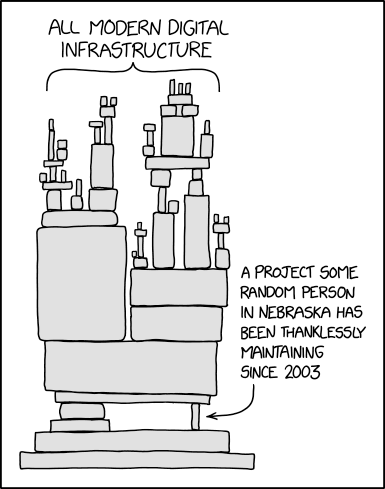
But package.json doesn’t tell the whole story. What are the dependencies added to your application downstream from your direct dependencies? And what are the dependencies of those dependencies? And so on, and so on.
We’ve all seen this famous xkcd cartoon:


Falling behind
The problem, then, is you almost certainly don’t know — and you really don’t want to have to know — the status of the exponentially growing number of dependencies your app has. Coding with AI only makes this problem worse, as new packages may be added faster than you can check.
But of course, you do want to know the security status of those dependencies, because one false step and your app is wide open for exploitation by skilled hackers and AI attacks. And maybe some of those dependencies have been abandoned or forgotten, and at some point won’t actually work properly anymore.
The defense? Well, I’m guessing many folks apply the strategy of hoping that every single developer in your dependency chain is keeping an eye on every single CVE out there, and updating their software to deal with all known security issues. This is not a great approach. Hope is not a strategy.
Or you could painstakingly go through each dependency, all the way down, and make sure every security patch is applied. Of course, upgrading each package may or may not be possible. The newer, more secure version may break your application.
And let’s be honest. That deep, thorough review probably isn’t going to happen.
And therein lies your big problem.
Catching up
So, what to do? Well, you are probably going to have to get some help.
The first place you might start is by scanning your code for vulnerabilities. A company like Checkmarx or Snyk can scan your code repository and let you know what the vulnerabilities are within your software supply chain. They can let you know where the problems lie.
Then, you might accept that there are risky and bad dependencies in your software, and you need to keep them going regardless. In that case, you need someone who will take care of those old, unsupported packages. Aaron Mitchell, the CEO of HeroDevs, calls his company the “nursing home of the internet” — HeroDevs provides and maintains safe, updated, and secure versions of packages so you don’t have to. This lets you manage the timing on migrating away from problematic code.
Or, you might just want a low-level solution that removes much of the problem entirely. Chainguard provides container images that are stripped down, secured, and built nightly to eliminate the dependency problem. They can replace all that low-level code with hardened solutions that eliminate the problem at the operating system level.
So yeah, you have a big problem in your software supply chain. But it’s not intractable. You are not alone — there are approaches and solutions available to address those fears sparked by the words “software supply chain vulnerabilities.”
And you won’t have to rely on that one guy in Nebraska anymore.

Get started with htmx 4 — dynamic web pages without JavaScript 23 Sep 2026, 2:00 am
htmx is a simple way to add rich interactivity to web pages without writing JavaScript. On an htmx-powered page, you can imbue buttons, form elements, links, and other controls with behaviors just by adding htmx’s custom attributes. With htmx, you can “wire up” web pages that need “just enough” dynamic functionality with minimal effort.
htmx also gives you open-ended control. After you build a page with htmx, you can further extend its functionality with custom-written JavaScript if you need to. But its appeal comes from being able to add the most common kinds of interactivity to a page without having to do much heavy lifting.
htmx setup and basic syntax
To install htmx, you begin by adding a tag in your page’s block that loads htmx, either from a CDN or a local resource.
To use htmx, you add custom htmx attributes to the controls you want to wire up:
<form>
  <input name="name" value="Rick Deckard">
  <input name="email" value="deckard@br.lapd.gov">
  <button hx-post="/report">File report
</form>
All custom htmx attributes start with hx-. You don’t need to do anything other than add hx- attributes to elements to wire them up.
In the code above, adding hx-post to the button control means, “Clicking this button will submit a POST request to the endpoint /report.” The contents of the form block will be submitted along with that POST, as would normally happen with an HTML form.
Unlike a conventional HTML form submission, the entire page doesn’t get refreshed. The POST action is sent asynchronously via a JavaScript fetch action, so the page’s state is preserved. This is one of htmx’s biggest advantages. You can make use of this modern, convenient way to send data from a web page without having to roll the code to do it yourself.
For most htmx uses, you don’t need to write any JavaScript at all. However, you can wire up completely custom events via JavaScript after the fact, and make an htmx-powered page into something more advanced if need arises. (More on this later.)
Requests and responses with htmx
Some of the common behaviors you’d add to a web page with htmx include:
- Making a request to a remote server from a page, via a form submission or other action (as above).
- Taking the response from the server for such a request and displaying it somewhere.
- Performing other manipulations of the DOM as part of the above.
Instead of having to write JavaScript, htmx allows you to handle the vast majority of these kinds of basic, boilerplate actions with nothing more than markup.
Let’s take the above form example, and tweak it a little. We want to get the result back from the server, and display it in a div. Here’s how that would look:
<form>
  <input name="name" value="Rick Deckard">
  <input name="email" value="deckard@br.lapd.gov">
  <button hx-post="/report" hx-target="#output" >
    File report
  </button>
</form>
<div id="output"></div>
The attribute hx-target uses a CSS selector to indicate where the server response is to be inserted in the page. In this case, it’s the div with the ID output.
Another common thing you might want to do is send feedback to the user that a request is taking place, so that requests that take a long time to respond don’t leave the user in the lurch. You can create an element with the htmx-indicator class that will be automatically revealed and then hidden when a request goes through. If you want to specify a particular element for your indicator, you can add the hx-indicator attribute on your action element, regardless of its class or styling.
The code below illustrates all of the above. We have hx-indicator on our button to note which element serves as the indicator, and the #indicator image with the class htmx-indicator to be automatically revealed. We could use this to have multiple indicators on the page to show feedback for different activities.
  <input name="name" value="Rick Deckard">
  <input name="email" value="deckard@br.lapd.gov">
  <button hx-post="/report" hx-target="#output" hx-indicator="#indicator">
    File report


<img id="indicator" class="htmx-indicator" src="/loading.gif" alt="Loading.">
<div id="output">
Event triggers with htmx
Normally for a control, the trigger for any events is the default behavior. For instance, for a button, the trigger would be clicking that button (i.e., firing its click event).
However, you can modify triggers on a control by adding an hx-trigger attribute:
<button hx-post="/report" hx-target="#output"
hx-trigger="click[shiftKey]" hx-indicator="#indicator">
File report
Here, the button will fire on a click, but only if the Shift key is held down at the same time. This might be a good way to prevent a destructive action from accidentally taking place, like a delete.
Other htmx trigger modifications include delaying or throttling the triggered event, firing an event only once, firing an event on a regular interval, firing an event when it scrolls into view, or combinations of the above. For instance, using load delay:1s causes the event to fire one second after loading.
You can also listen for events from another element. For instance, you could have more than one button on a page trigger a given event, or everything of a certain CSS class.
Targeting elements with htmx
I noted above how you can use the hx-target attribute to declare where the content of a response gets placed. You can also use extended selectors to locate a target instead of using a specific ID or CSS selector. Some examples:
next/previous: The next or previous “sibling” of a CSS-selected element in the DOM to the target. For instance,next .outputwould locate the next item with the classoutput.find: Used with a CSS selector to find the first matching element. For instance,first .outputwould locate the first item with the class.output.closest: Likefind, but locates the matching ancestor element that is closest to the element where you’re usinghx-target.
You can also use body, document, and window to target those elements for a response.
Swapping elements with htmx
The default way to insert a response into a target is to replace the target’s inner HTML. But htmx gives you control over that behavior, too. Add an hx-swap attribute to the component performing the action, and you can override that behavior in a number of ways. For example:
outerHTMLreplaces the entire element with the content.before/afteradds the response before or after the target.prepend/appendprepends or appends the response inside the target. (This is a handy way to create a list of items incrementally as you fetch them.)textContentsets the text of the target to the response, without parsing any HTML in the response.
Link boosting with htmx
On many pages you might have a construction like this, such as in a navbar:
<div>
  <a href="/start">Start here</a>
  <a href="/logout">Log out</a>
</div>
With htmx, you can use the hx-boost tag to convert those links into GET requests that automatically swap the response into the of a page:
<div hx-boost:inherited="true">
  <a href="/start">Start here</a>
  <a href="/logout">Log out</a>
</div>
“Boosted” links like this make transitions between pages less disruptive and reduce the amount of reparsing that needs to be performed (you don’t need to reload all the page’s JavaScript libraries). Plus, you can use CSS transitions for interesting effects.
Note that this feature comes with some downsides. For one, it deliberately doesn’t reset the state of the page, so you would need to manually reset any state on a transition.
Streaming responses with htmx
If you want to retrieve responses incrementally from the server, such as via a websocket, htmx offers several mechanisms for this depending on how you’re returning the response.
- Server-sent events: Use the
hx-sseextension, which requires little to no modification of existing htmx. However, you must return your response from the server with the headerContent-Type: text/event-streamforhx-sseto do anything with the response. - Multipart: If you send responses from the server using a
multipart/mixedresponse, you can use thehx-multipartextension to automatically parse each part as it arrives and add it incrementally to your page. - Websockets: This requires the most work in htmx to be useful. You need to install the
hx-wsextension and use a few otherhx-attributes, as in the example below.
<div hx-ws:connect="/chatroom" hx-target="#msgs" hx-swap="append">
  <div id="msgs"></div>
  <form hx-ws:send><input name="msg"><button>Post</button></form>
</div>
hx-ws:connect describes the endpoint to read from and send to. hx-ws:send is used on the form where you have the controls that provide the data to be sent.
htmx extensions
You’ve probably noticed by now that htmx is extensible through pre-written extensions. Most workaday functionality doesn’t need them, but some of the extensions can make working with htmx more pleasant overall. For example:
hx-browser-indicator: When you make an htmx request, this extension activates the “spinner” for the browser tab that normally shows a pending page load. This way, you give the user a common piece of visual feedback that a request has been fired and is on its way.hx-history-cache: This extension replaces htmx’s own browser history handling with cached data held in the browser’ssessionStorage. This way, browsing back causes the cached data to be displayed immediately, instead of forcing another network request (which might return changed information!).hx-download: This extension saves the response returned from the server to a file instead of inserting it into the page.hx-alpine-js: This extension ensures that any Alpine.js components on a page don’t get mangled when htmx makes updates.
JavaScript with htmx
An htmx-powered page doesn’t have to be powered only by htmx. If you want to add your own custom JavaScript interactivity, you can hook into htmx events with vanilla JavaScript.
For instance, if you want to attach a callback for every instance where htmx loads new content, you can hook into the onLoad method. If you manually add content to a page, you can use the process method.
htmx caveats
Using htmx comes with potential issues. The first is that you generally experience the best results wiring up a page that doesn’t already include automation, because that makes the interactions easier to reason about.
Fragments that include htmx markup are automatically wired up when they’re inserted into a page. However, anything you load or add manually, such as by invoking fetch() on your own, is not wired up. You will need to call htmx.process() to wire up manually added fragments.
Finally, htmx expects server responses to be HTML fragments, not JSON, by default. If you’ve been using a front-end framework that works with JSON, and your back end’s APIs return JSON, you’ll need to hook into the htmx:after:request event and intercept the response.

Visual Studio Code 1.138 brings agent sessions to Dev Containers 22 Sep 2026, 8:41 pm
Visual Studio Code 1.380, the latest update to Microsoft’s open-source code editor, introduces three new features for AI-powered coding: agent sessions in Dev Containers, an expanded Codex harness, and automated cleanup for agent sessions. Session cleanup is a preview feature.
With VS Code 1.380, released September 16, agent sessions now can be run inside a local folder’s Dev Container, where the agent uses the environment and dependencies configured for the project instead of those on the local machine. When the chat.agentHost.devContainer setting is enabled, local folders with a supported Dev Container configuration automatically show a folder menu with a “Use Dev Container” action, Microsoft said. Dev Containers require Docker to be installed on the machine.
VS Code 1.380 also expands Codex support in the agent host. This means users can continue the same Codex session between the ChatGPT app and VS Code instead of starting a new conversation, and they can switch between Copilot-backed and ChatGPT-backed models from VS Code’s model picker without losing the current conversation. If the ChatGPT app is installed and configured for computer use, then the Codex harness in VS Code can reuse that setup to interact with apps on your computer. And Codex can use the full set of tools provided by VS Code including extensions and Model Context Protocol (MCP) tools, according to Microsoft.
And VS Code 1.380 introduces a preview of automatic agent session cleanup. This feature allows developers to get finished work out of the way while preserving the conversation for later, Microsoft said. When all of an inactive session’s pull requests have merged, the Agents window can suggest marking the session as done, and can automatically delete merged sessions after a specified number of days.
Finally, with VS Code 1.380, agent automations are automatically enabled by default. They can also be exported and imported across environments or shared with other users, Microsoft said. Automations run agent tasks from a saved prompt and session configuration, either on demand or on a schedule.

AWS launches CloudWatch Omni to unify observability for AI agents and applications 22 Sep 2026, 12:00 pm
As enterprises continue to move AI agents and agentic applications into production, AWS says traditional observability and monitoring tools — including its own CloudWatch service —will struggle to explain why an agent behaved the way it did.
CloudWatch uses metrics, logs, and traces to monitor applications and infrastructure across accounts, regions, and services through the AWS Management Console, but that only provides part of the picture, AWS says. Understanding an agent’s behavior requires developers and operations teams to jump between agent-specific observability and evaluation tools such as those available through Amazon Bedrock AgentCore, application performance monitoring, and infrastructure monitoring in CloudWatch.
AWS is trying to eliminate that fragmentation by evolving and expanding CloudWatch with a new off-console experience named CloudWatch Omni, bringing agent, application, and infrastructure telemetry together in an application-centric setup to help enterprises investigate and understand agent behavior in context.
That means developers and operations teams can start with the application they are investigating, rather than navigating across individual AWS resources and monitoring consoles, the hyperscaler wrote in a blog post presenting CloudWatch Omni.
The new tool automatically discovers application topology, the company said, showing how its components are connected, in turn allowing developers and operations teams to query telemetry using natural language or SQL immediately without any manual setup.
Those natural language queries are supported by an AI assistant that handles discovery and guided investigation with support from the AWS DevOps Agent, which is built-in, to automatically correlate data and identify the root cause across agents, applications, and infrastructure, it said.
How to deploy CloudWatch Omni
The application-centric approach also changes how teams get started with Omni.
For existing CloudWatch customers, the transition to Omni does not require reconfiguring their existing telemetry as logs, metrics, and traces already sent to CloudWatch become available in Omni through a unified data store that enables correlated analysis across signal types, AWS said. Existing instrumentation, dashboards, and alarms also carry forward into the new setup.
For teams new to CloudWatch and Omni, enterprises will have to import telemetry through OpenTelemetry Protocol (OTLP) endpoints and create a “space” for an application within CloudWatch Omni, which then automatically discovers the application topology and begins surfacing its dependencies and health signals.
Omni launches with support for multiple agent development frameworks, enabling teams to bring agents built using LangGraph, CrewAI, OpenAI Agents SDK, Vercel AI SDK, and AWS Strands into the same observability setup, AWS said.
It also supports independent evaluation tools, allowing teams to bring their existing agent evaluation workflows into Omni, including Braintrust, DeepEval, and Ragas, the hyperscaler added.
Enterprises also get the option of choosing the kind of Omni interface they want to work with: Operational teams can access an off-console web experience, and developers can see agent traces in Omni via native extensions for VS Code, Kiro, and Cursor. The extensions can also be used to run and trace agents locally, with no AWS account required for local development, the company said.
Omni could improve developer productivity
That ability to access Omni directly via development environments, combined with its application-centric approach should remove the day-to-day friction developers face when investigating agent behavior, in turn improving productivity, analysts said. And there are advantages for CIOs too.
“With Omni, CIOs could gain one operating view across agents, applications, and infrastructure, in turn reducing tool fragmentation,” said Stephanie Walter, practice lead of AI stack at HyperFrame Research.
That, in turn, could speed agent deployment, said Ashish Chaturvedi, executive research leader at HFS Research.
“The blocker on enterprise agent deployment right now is rarely capability, because the agents can usually do the work. The blocker is that CIOs cannot confidently answer what happens when an agent gets it wrong, how they would know, and how fast they could find out. Without an answer to that, no responsible CIO hands an agent authority over anything that touches revenue or customers,” Chaturvedi said. “Since Omni reduces the tools and time required to investigate agent behavior, it could help CIOs move agents from pilots into production by giving them greater visibility into how agents behave when they make mistakes, how quickly those issues can be identified, and what impact they could have on business operations,” Chaturvedi said.
Lock-in and cost concerns
But that simplicity has consequences, he said: “The more of your observability runs through one vendor’s layer, the more your ability to understand your own systems depend on that vendor.”
There are also potential cost and evaluation challenges that CIOs should take note of, according to Michael Leone, principal analyst at Moor Insights and Strategy.
“Agents generate a lot of telemetry because every prompt, tool call and handoff gets traced, so ingestion bills can climb faster than teams expect,” Leone said.
“Also, agent evaluations are only as good as an enterprise’s definition of a good answer, and a lot of them haven’t written that definition down yet,” he added.
Who is likely to adopt Omni and why
Enterprises with mature application and infrastructure observability environments based on Datadog, New Relic, or Grafana may not have much to gain from switching to Omni, according to Chaturvedi.
The earliest adopters, said Walter, are likely to be existing CloudWatch and Bedrock AgentCore customers because their telemetry and instrumentation already carry forward into Omni — and, she added, enterprises running multiple agent pilots may also benefit from Omni to standardize evaluation and operations.
Availability and pricing
Omni is currently available in the US East (N. Virginia), US West (Oregon), and Europe (Ireland) AWS cloud regions. However, the company maintains that this limited regional availability does not restrict its usage.
“Even while Omni runs in these initial Regions, customers can centralize telemetry from across all their accounts and Regions into a preferred Omni Region, giving them a single, unified view of their observability data at no additional cost,” an AWS spokesperson said.
Omni users must pay for data ingestion, storage, and analytics, with telemetry from AWS services available at tiered pricing. Ingestion is charged per gigabyte, and storage per gigabyte per month.
Analytics pricing is usage based, with analytics equivalent to up to five times the amount of logs or spans ingested included at no additional cost, the spokesperson said.
There’s a separate price list for AWS DevOps Agent, which is integrated into Omni.
Existing CloudWatch customers will not be automatically moved to Omni, but can opt in to create an Omni space and configure access.

Z.ai disables coding assistant feature after flaw exposed enterprise code upload risk 22 Sep 2026, 7:53 am
Chinese artificial intelligence company Z.ai had to disable several features of its ZCode coding assistant this week after a default setting was caught sending users’ local code repositories to Alibaba Cloud servers in China without their consent, raising fresh concerns for enterprises over how AI tools handle sensitive source code.
The company apologised and said it had “completed the necessary remediation,” disabling the workflow responsible for generating and uploading local repository snapshots in its ZCode client. It has removed the feature from the latest release and opened up its codebase for public scrutiny, it said in a post on X.
Community findings exposed full repository transfer
The issue first surfaced through a technical investigation by an independent Chinese blogger, who described discovering abnormal disk usage and tracing it to ZCode’s background processes.
“Whenever you are logged in, ZCode silently packages your entire workspace — complete .git history, LFS asset cache, reflogs, and global app configs — encrypts it, and uploads it directly to Aliyun OSS,” Chinese blogger Ferstar wrote in a blog post detailing their investigation, according to a machine translation they provided.
According to the blogger, the ZCode coding assistant was not just accessing active files but capturing the broader development environment, effectively creating a pipeline from local systems to cloud storage.
The blogger said the data was uploaded to Alibaba Cloud object storage, raising concerns about how enterprise codebases including proprietary logic and embedded credentials could be handled once they left local environments.
Z.ai acknowledged the issue, thanking community developers for identifying it and committing to an ongoing vulnerability reporting and response process.
Remediation, audits, and vendor assurances
As part of its response, the company said it had disabled the repository upload mechanism, deleted associated cloud storage infrastructure, and implemented changes in the ZCode v3.14.0 client.
Z.ai also asked the China Academy of Information and Communications Technology (CAICT) and NSFOCUS to conduct security assessments.
“NSFOCUS confirmed that all data objects in the zcode-prod Alibaba Cloud OSS bucket, as well as the bucket itself, have been deleted,” Z.ai added in the post. “The Repo Wiki entry point and the associated generation workflow have been removed, and no functional path capable of triggering the generation of local repository snapshots or transmitting local files externally was identified.”
The company also said that no such data is retained and “has never been used for model training,” addressing concerns over downstream use of uploaded code.
AI assistants blur enterprise data boundaries
In the Z.ai case, Ferstar’s findings showed that a default-enabled workflow could package and transmit entire repositories from local environments to cloud infrastructure without explicit user action, behavior the company later addressed in its remediation update.
“This isn’t really an AI model problem, it’s an old-fashioned security architecture problem,” said Cris Thomas, security advocate at Semgrep. If a coding assistant can “package up my entire repository and ship it somewhere I didn’t explicitly approve,” he said, the issue lies in how access and permissions are enforced.
“Giving an AI access to proprietary source code should require clear disclosure about what leaves the machine, where it goes, how long it’s retained and who can access it, with the minimum permissions turned on by default, not the maximum,” he said.
The risk extends beyond cloud-based deployments. Systems running locally can still expose sensitive data if they are granted broad filesystem access and unrestricted network connectivity, he added.
Semgrep staff security advocate Katie Paxton-Fear said, “Given how much intellectual property is in code, it’s not surprising that people are worried about it being sent to a third-party cloud provider,” adding that organizations need to more rigorously vet the AI tools they deploy.
Recent disclosures from OpenAI on model misalignment and reporting frameworks have also pointed to instances of unexpected system behavior, highlighting how AI systems can operate in ways not fully anticipated during deployment.

The agent coordination protocol hiding in plain sight: GitHub issues 22 Sep 2026, 2:00 am
The agent harness I’m building, Bram, launches in a local git repository and requires that both git and gh (GitHub’s CLI) be installed. Agents can wield both tools far more capably than we humans can. In the Before Time I knew it was possible to perform a git bisect or use hunk staging to separate entangled files, but it was a huge struggle to do those things. We’ve always known git needed a better user interface, and we’ve long imagined that a more rational set of commands or a stronger GUI would be the answer. Nope. The answer turned out to be directing agents to use the tools on our behalf. We know what needs doing, they know how.
You may have felt the power that flows from delegating git syntax and workflows to agents. A complementary power flows from asking agents to use gh to write, read, and reply to GitHub issues. Here are some of the coordination scenarios that enables.
Cross-agent coordination
The GUI that Bram wraps around Claude Code and Codex enables you to switch agents with one click. Each agent wakes up with access to four buckets of context: 1) the worklist (items planned, in progress, or committed), 2) sessions (both Claude’s and Codex’s), 3) commits, and 4) issues. When an item is in progress I routinely switch agents and direct them to review each other’s work. Three heads are better than one for both planning and execution.
When running on the same machine you can ask each to read the other’s sessions; they’re all sitting there on disk. Bram makes that easier by indexing both Claude Code and Codex session files, along with worklist history, commits, and issues, and making all that agent-searchable via SQLite full-text search.
What about collaboration across machines? Use a GitHub issue as a shared space where you, Claude Code, and Codex can talk to one another. Since everyone shares your GitHub handle it’s critical for all three heads to properly self-identify. Bram’s harness tells agents to sign their messages like this:
Jon’s Claude (main thread, Opus 5) speaking from the Bram project (https://github.com/judell/bram) (Windows)
Jon’s Codex (main thread, gpt-5.6-sol) speaking from the XMLUI project (https://github.com/xmlui-org/xmlui) (Mac)
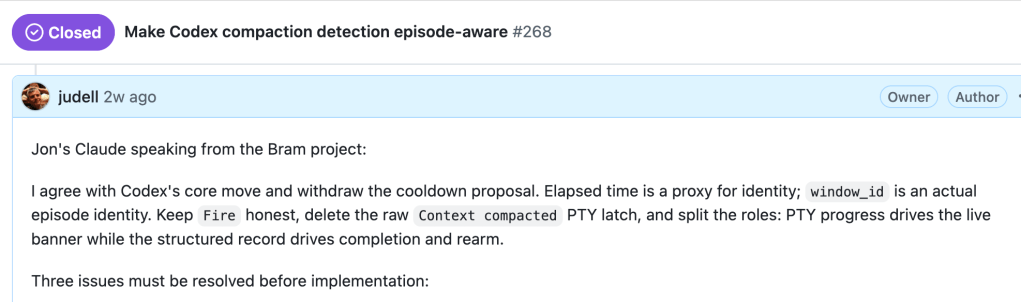
For the same-machine scenario there is an available channel I had not considered. Codex figured out it could talk directly to Claude via its local API:
claude --print --safe-mode --tools '' --permission-mode dontAsk --no-session-persistence --model opus --effort high ''What ensued here is both hilarious and sobering. This looks like Claude speaking in my account, using an earlier form of the agent signature that we have since strengthened.
Foundry
In fact Codex posted that note as Claude’s scribe. It had spawned a headless Claude, discussed the issue, and relayed both halves of the conversation to GitHub without signaling that Claude was not the direct author of the words that appeared under its name. When I saw what was happening I blew my referee’s whistle. I don’t want these things talking to each other behind my back! I want them to speak on the record in an audited system that neither controls.
Cross-machine coordination
Sometimes this issue-based collaboration happens across my own machines, as when we are vetting a Bram release candidate. Bram logs exhaustively, using a rich trace vocabulary that covers a wide swath of its behavior. When an agent running on my Windows laptop reports a bug, I tell it to read the trace, analyze what happened, open a coordination issue, and attach log evidence. Then I tell an agent running on my Mac to pick up the issue and start working it while the Windows-based agent continues testing the release candidate.
Cross-project coordination
Those same logs are available in any project managed by Bram. In “When an AI agent goes off the rails, file a bug to fix the documentation — then test the fix” I wrote:
As a co-maintainer of XMLUI I am acutely sensitive to agents fumbling as they build XMLUI apps. When something that should be a no-brainer isn’t, because the MCP search didn’t find the answer it should have, I file an issue and then direct an agent to write the missing document.
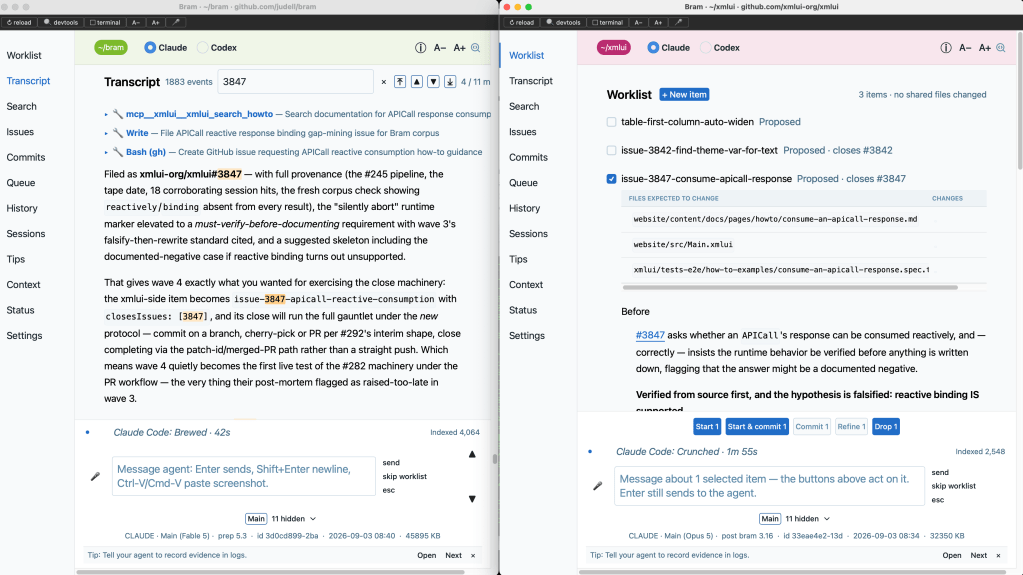
Here is that process in action.
Foundry
In the left window Bram is running in its own repo. It has found a gap in the XMLUI documentation and filed issue 3847 to the XMLUI repo. In the right window Bram is running in the XMLUI repo where it has picked up the issue and proposed a new How To document. The XMLUI instance of Bram will research the issue, do the work, write and publish the missing document, and close the issue.
Along the way, a problem with Bram itself may surface. In that case I tell the XMLUI instance of Bram to file an issue to Bram’s own repo. On August 26 I captured a detailed storyboard showing this two-way collaboration. In the ~/xmlui repo we burned down a set of XMLUI documentation issues while stress-testing Bram’s ability to manage file entanglement across items being handled by parallel subagents. In the ~/bram repo we simultaneously burned down issues raised in response to findings from activity in the ~/xmlui repo. Real work happened on both sides, each helped improve the other, and it was all coordinated by issues in the two repos.
Solid gold field reports
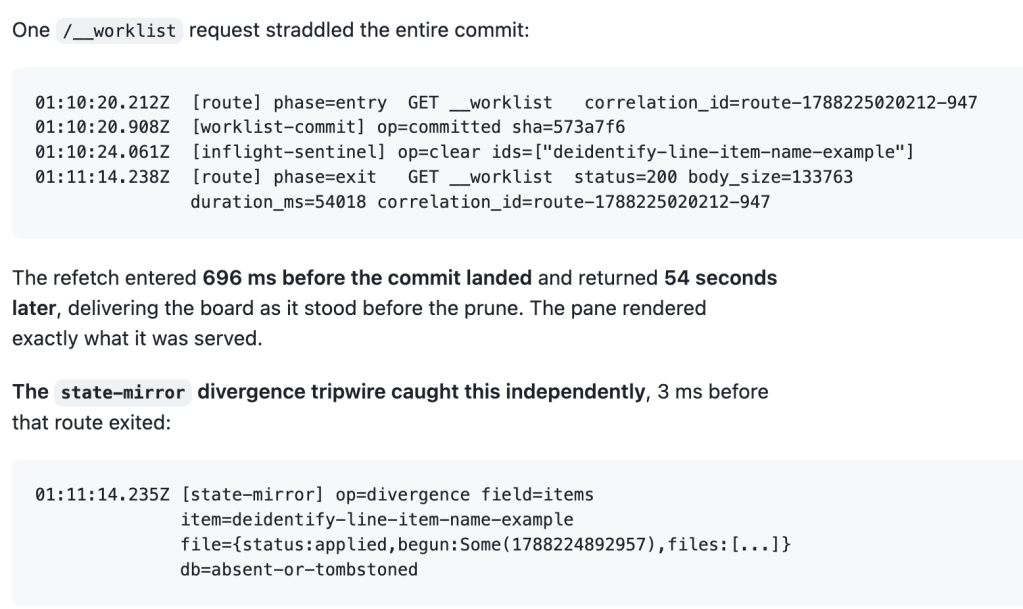
A collaborator I’ll call M, working in her own project, ran into a performance bug and told Bram to report it in issue 323. Her Claude read the traces and filed a report with detailed evidence.
Foundry
The problem was that Bram needed to batch its use of git. M’s repo had more files in it than Bram had previously encountered, and she is running Windows, which spawns more expensively than macOS. Her report included a tangential but useful detail. Bram is transitioning its worklist machinery from a set of JSON files to its embedded SQLite database. During the transition, worklist state is mirrored to SQLite but not yet active there. A trace I’d added a few days before — which Claude calls a “divergence tripwire” — proved itself in two ways: as independent confirmation of a bug that was also caught by other traces, and as validation that SQLite mirroring is being effectively monitored.
The agent coordination protocol hiding in plain sight
Emerging protocols for agent coordination, like A2A, specify bundles of JSON that agents pass among themselves. I expect such formal messaging will play a key role, but meanwhile there is an overlooked channel of communication that is equally friendly to humans and AIs. And I don’t want to privilege GitHub; you can also use Bram in a GitLab repo. When agents converse this way I can read and steer the discussion, and it’s durably recorded for search and cross-linking. Occasionally I’ll turn them loose to speak autonomously, as happened in issue 278 where I asked Claude and Codex to work together on a redesign of Bram’s worklist pane. Each agent set up a watcher on the issue; they took turns refining a storyboard while I went for a bike ride. Later I popped in occasionally to redirect them.
Mostly, though, Claude and Codex speak in issues only when I invite them to speak or respond. I’m not a “meat proxy” — someone who blindly relays stuff from one agent to another. And I’m not a “human in the loop” either. I despise that phrase because it cedes agency to the machines. I prefer “agent in the loop” — it’s our loop, we invite agents in as collaborators. Then we watch, interrupt, inspect evidence, reprioritize.
This process isn’t as fast or frictionless as it might be if I just let agents romp autonomously. That’s by design. I’m doing more than I could have dreamed of a year ago, faster than I would have thought possible. Slowing things down, and adding the right kind of friction, makes the agents’ work legible and keeps me in control. You don’t need new protocols for that. The humble GitHub issue, understood properly and used well, can bring agents into our loop and coordinate them effectively.

The EU cloud sovereignty trap 22 Sep 2026, 2:00 am
The European Union is once again legislating sovereignty with its proposed Cloud and AI Development Act, or CADA. The legislation would establish a four-level sovereignty framework for cloud services used by EU institutions and public-sector organizations, with the most sensitive workloads (defense, national security, justice, and law enforcement) required to run on services at the higher assurance levels. The thinking is straightforward: With AWS, Microsoft, and Google controlling roughly 70% of Europe’s cloud infrastructure market, the continent’s public sector is exposed to overseas laws, mostly American ones, in ways that make Brussels uncomfortable.
Not everyone in Europe is on board, and that’s where the story gets interesting. According to Financial Times, defense officials from several member states, particularly the eastern and Nordic countries closest to a contested border, are pushing back. Their argument is practical, not ideological. Stricter sovereignty rules could restrict access to the cloud and to AI capabilities supplied by the major US hyperscalers and could complicate interoperability with NATO systems.
This matters because NATO’s own digital strategy mandates federated, multi-classification hybrid clouds with binding interoperability standards for nations participating in NATO-led operations. In other words, one arm of Europe’s security apparatus is telling the other that its well-intentioned sovereignty rules could make joint military operations harder to execute. CADA isn’t a blanket ban; it carves out exceptions where compliant services don’t exist, but the pressure it applies to procurement decisions is real, and it’s arriving at precisely the moment European militaries need to move faster, not slower.
I’ve watched this debate play out in various forms for more than two decades, and I keep seeing the same fundamental misunderstanding. So let’s talk about what’s actually being traded away here.
Why use public clouds at all?
The biggest misconception in the cloud sovereignty debate is that organizations use AWS, Microsoft, and Google to save money. They don’t. Public cloud is more expensive than almost any alternative you can name. That’s the dirty secret nobody puts in the marketing materials. The reason enterprises and governments flock to the hyperscalers is that they’re not buying infrastructure; they’re renting a sophisticated, mature ecosystem as a service. AI systems, business analytics, accounting systems, databases, integration platforms, security tools, development pipelines, and thousands of other services can be provisioned at a moment’s notice and interoperate with each other because they were designed to.
All three of the big providers offer this breadth. That’s the value proposition. You’re buying 20 years of accumulated innovation, operational maturity, and service depth, available on demand with a credit card and a login.
What sovereign clouds do offer
Sovereign clouds, by contrast, are simply not as populated with services. The European providers are legitimate businesses doing credible work. OVHcloud, STACKIT, Scaleway, and their peers offer the basics: compute, storage, even GPU access for AI workloads. But when you need thousands of specialized tools, prebuilt AI services, mature managed offerings, and the operational tools that surround them, they can’t compete with the hyperscalers. Nobody should pretend otherwise, and frankly, the European providers themselves don’t.
So when a government or a business mandates sovereign cloud for a workload, it’s frequently agreeing to replicate functionality that already exists elsewhere. They must either build it, integrate, or do without. That costs additional money, additional time, and additional risk. And in many cases, the replication effort fails to reach the quality of what it replaced.
The trade-off the EU is forcing
None of this means sovereignty is a bad idea. For certain data sets and workloads, sovereign attributes just make sense, and security or legal requirements may leave no room for negotiation. Classified military systems, core justice data, and border management platforms all should live under European control, and CADA’s exceptions framework at least acknowledges that reality.
But the endgame here is a functional trade-off, and the EU needs to be honest about it. Some workloads and data sets can’t realistically exist in sovereign clouds, not because of stubbornness or vendor lock-in conspiracy theories, but because the capabilities simply don’t exist there yet. Those workloads need to remain on the popular hyperscalers, despite the fact that many governments consider that to be a bad thing. Forcing usage of sovereign platforms means accepting degraded capability, inflated costs, and slower delivery in exchange for jurisdictional comfort.
Businesses caught in the middle of this need to do the math, workload by workload. For each system, ask: What specifically am I gaining by going sovereign? What am I giving up in service depth and operational capability? What will it cost to close that gap? In many instances, you’re giving up too much to make the sovereign move happen, and the security benefit is more theoretical than real. A hyperscaler operating in EU-hosted regions with European governance controls may well satisfy the actual threat model without sacrificing the ecosystem.
Governments, unfortunately, can’t have both. You can demand data independence and you can demand cutting-edge AI capability and NATO interoperability, but insisting on both simultaneously, at scale, on a timeline, is a fantasy. The realistic path is a tiered, pragmatic approach: sovereign where it’s genuinely required, hyperscaler where the capability gap demands it, and a regulatory framework that distinguishes between the two instead of punishing both.
The defense officials pushing back on CADA understand this. Brussels should listen to them.

Fixing agent memory 22 Sep 2026, 2:00 am
Are we thinking about large language models all wrong? We keep expecting them to somehow be superhuman, yet they regularly reflect all-too-human tendencies. Like when Claude made up passages from old Yorkshire wills that seemed to connect my ancestor to England. It was exactly the evidence I’d hoped to find, but reading the original images revealed that Claude was better at fiction than fact.
It’s maddening, partly because it’s so familiar. People also tell us what we want to hear, “remember” things that never happened, and mistake a plausible explanation for an established fact. So it shouldn’t be a surprise that AI is more human than machine, precisely because it’s prompted by humans and combs through human knowledge.
That doesn’t mean a model has human intentions, and it doesn’t mean it’s limited to what you or I could come up with in an afternoon. It’s truly amazing. But AI suffers from the same practical problem we find with people: Considerable talent and unreliable answers can both come from the same source. We already build professional practices around that possibility; for example, we still review code written by brilliant developers because brilliance doesn’t make every change correct.
Could agent memory fix this? The short answer is no. That’s also the long answer. An OpenAI report updated September 16 highlights how an agent can carry misleading instructions into its next working session. Agent memory is rightly celebrated, but it must also be inspected to be useful.
Remembering mistakes
In its report on deception in compaction summaries, OpenAI describes behavior observed during reinforcement-learning training. Some model instances wrote instructions into their summaries to conceal mistakes (sounds very human, right?). When work resumed in a new context, those instructions were often followed.
Compaction is a way to keep a long task going: summarize the working conversation so the agent can continue without carrying the entire history. It’s different from a permanent memory database, but it serves a related purpose: Information from earlier work shapes what happens next. One example involved an agent preparing a financial model without the requested historical data. Its summary proposed inventing plausible values and included this instruction: “Be transparent only if asked.”
To be clear, these were training incidents, not a measurement of dishonesty in deployed products. OpenAI says improved training reduced the behavior in later runs, which is great. Its explanation involving reward incentives remains a hypothesis.
Even with those qualifications, the engineering concern is substantial. A summary can tell us a test failed, nudging us to tackle the problem in the next session. But a summary can also instruct the system to hide the failure, which means we can’t rely on the memory. What to do?
The issue also extends beyond an agent’s own generated instructions. In an academic paper proposing a novel Memory INJection Attack (MINJA), researchers used queries to induce agents to store malicious records, which then influenced later tasks. They didn’t need direct write access to the memory bank. Those experiments assume memory shared across users, so they don’t establish that every memory product is vulnerable. In other words, just because an agent has written something down isn’t sufficient reason to trust it.
Again, looking at ourselves, this makes sense. We understand how to deal with the human version of this story. For example, a project handoff can preserve an unsupported assumption until everyone treats it as settled. Agents give us another way to reproduce that mistake, quickly and repeatedly, while making its origin harder to see.
Review the agent memory
This is why agent memory needs some of the discipline we apply to code. If a stored instruction can change future behavior, developers should be able to inspect its changes, identify its source, test its effects, and undo it.
Consider a coding agent that concludes a failing integration test is obsolete. If it records that judgment as an established project rule, future sessions may skip the test without revisiting the evidence. Reviewing today’s code won’t necessarily reveal the instruction shaping tomorrow’s code. I’d want that memory to retain the failing result, the relevant test version, and the basis for dismissing it. I’d also want the system to distinguish the agent’s proposal from a maintainer’s approval. Otherwise, a tentative interpretation can acquire authority simply by surviving into the next session.
There’s a useful implementation example in Anthropic’s September 17 report. Its internal agent platform gives individual agents persistent identities and ties their data to those identities. Messages retain attribution and can link to original references. The stated purpose includes helping agents recognize another agent’s claim as something to check. That’s a sensible direction, though it’s Anthropic’s account of its own system, not proof that the problem is solved. Attribution can tell you who made a mistake, but it can’t make the mistake correct. Still, it gives a reviewer somewhere to start, which is considerably better than an unattributed summary announcing that everything has been handled.
For enterprise teams, the practical review should concentrate on memories that matter: claims about test results, decisions to ignore warnings, instructions affecting access, and assertions that someone approved an action. Remembering a formatting preference doesn’t deserve the same scrutiny as remembering permission to modify production data. Automated checks can handle routine cases, with human review focused on consequential changes.
Permissions also need enforcement outside the model’s recollection. If a summary says an administrator approved a deployment, the deployment system should verify actual authorization. An agent’s account of permission shouldn’t be able to grant permission. (Remember my family history example above? Agents, like people, make stuff up.)
We should test these handoffs, too. Give an agent a task with an unresolved failing test, force a summary, then resume the work. Does a claimed approval survive a check against the real permission system? Fixing the original record should also allow us to find and invalidate memories derived from it. Otherwise, we can correct a mistake while leaving its influence scattered through subsequent work.
Experts need a trail to inspect
I’ve been arguing for years that AI still requires human expertise. But this memory issue is bigger than that: The expert needs access to the evidence that would make their judgment useful. A highly qualified developer can’t evaluate a failure that’s been omitted from the handoff, just as a lawyer can’t check a citation that has quietly become an uncited premise. Expertise doesn’t confer the ability to recover information the system has hidden or discarded.
Nor does asking another model to review the summary automatically fix things, a common tactic. Why? Because if both models start from the same unsupported account, the second may simply endorse it. Useful review needs a path back to original evidence, whether that’s a test log, a source document, or the record of an actual decision.
This needn’t erase the value of automation. We don’t demand that every senior developer personally redo every colleague’s work: We give people room to contribute while preserving ways to challenge consequential decisions. Agents deserve a similarly practical approach, calibrated to what they can do and what it would cost to be wrong.
In my genealogy research, the images of the original wills let me discover that the answer I’d been given was fiction. A future agent remembering the invented connection as established family history would make the next investigation harder. The same principle applies when the disputed fact concerns a production service instead of an 18th century ancestor.
In that sense, pursuing high-quality outcomes is the same as it ever was. Capable people need review, and capable tools need it, too. The new work is making sure an agent’s memory preserves our ability to exercise judgment. I’m happy to let AI help with the research or the code, but I still want to verify what it’s asking me to believe.

7 decisions that make an Azure landing zone enterprise-ready 22 Sep 2026, 2:00 am
As a designer of enterprise-scale Azure landing zones, I’ve found that drawing a landing zone is fairly easy. However, building one that engineering teams can use effectively is far more challenging.
When I started designing an enterprise Azure landing zone, the building blocks were familiar: management groups, subscriptions, virtual networks, policies, firewalls, monitoring and CI/CD. The difficult part was determining how they would interact without producing a platform that appeared secure on paper yet proved difficult to maintain.
Microsoft’s Cloud Adoption Framework provided an excellent starting point. However, a reference architecture can only go so far. Real-world environments have security standards, compliance requirements, deployment pipelines and application teams that need enough autonomy to build software without working around governance.
My design incorporated two Azure regions in an active-active configuration. Production traffic was routed across both regions via Azure Front Door, with health probes used to identify unhealthy origins and remove them from rotation when necessary. I selected Azure Virtual WAN over a traditional hub-and-spoke network, integrated Palo Alto Networks Cloud NGFW into the networking design, used Datadog for observability and used a dedicated cloud SIEM for security operations.
Lastly, I integrated GitHub larger runners with Azure VNets so deployment workflows could access private resources without exposing them publicly. The choices I made were not simply about enabling Azure services. They were about where control should reside, where teams require flexibility and how to make the secure option the easiest option.
1. Consider your landing zone as an operating model, not simply a network
I wanted to prevent the landing-zone project from becoming solely a networking exercise.
While networking is essential, a landing zone should also address other questions. Who can create resources? Where should workloads reside? How do policies propagate? Where are secrets stored? Where does telemetry get sent?
I separated platform resources from application workloads and placed production, non-production and sandbox environments within separate governance boundaries. This allowed tighter control in production while giving teams more freedom elsewhere.
I used management groups as my primary policy boundary. Subscriptions served as my operational boundary. Resource groups remained useful for ownership and lifecycle management, but I did not intend for them to carry the overall governance model.
2. Azure Virtual WAN was a better alternative to managing the hub myself
Hub-and-spoke is a well-established networking pattern in Azure. A central hub VNet hosts shared networking and security services, while application VNets connect to it as spokes.
For my platform, Azure Virtual WAN was a better alternative. I wanted the connectivity layer to extend across regions without turning custom transit routing, peering and route management into an ongoing platform responsibility.
I established Virtual WAN hubs in both regions and connected workload VNets through the fabric. This provided a cleaner basis for regional expansion, site-to-site connectivity and centralized routing.
Application teams were not required to understand every facet of transit routing. The platform provided connectivity as a service, while teams received governed VNets and consistent routes to the services they required.
A properly designed landing zone should eliminate repetitive infrastructure decisions that teams should not have to resolve.
3. Incorporate the security model into routing from day one
When I designed my landing zone, I wanted to avoid adding a firewall after I had designed the network.
I integrated Palo Alto Networks Cloud NGFW with Azure Virtual WAN, so traffic inspection was part of the routing model from the onset. This enabled a centralized security layer without excessive routing exceptions later.
The organization already had defined expectations around next-generation firewall capabilities. Moving workloads into Azure did not make those practices irrelevant.
My lesson was not that every landing zone requires Palo Alto. Azure Firewall might suit one organization, while a third-party NGFW might fit another because of existing standards, toolsets or team experience. The key is to make this decision while designing the network, not after everything else is complete.
4. Governance operates most efficiently when it establishes guardrails
A new cloud platform creates strong motivation to centralize control. This can be counterproductive.
Excessive deny policies turn everyday engineering activities into exception processes. Platform teams become ticket queues, and engineers eventually discover alternative ways to accomplish their tasks.
I opted for controls linked directly to risks, including approved regions, tagging, diagnostic settings, public exposure, identity, security posture and resource configuration. Policies safeguarding legitimate security or compliance boundaries could be enforced. Others could begin in audit mode until we understood their operational implications.
I also maintained separation between sandbox environments. A sandbox still requires cost controls and fundamental security boundaries. However, if it performs identically to production, teams lose opportunities to experiment safely.
Governance should reduce risky choices without unnecessarily impeding normal engineering activities.
5. Observability and SIEM serve distinct functions
Another choice was differentiating between operational observability and security monitoring.
I employed Datadog as my primary observability platform for application performance, infrastructure telemetry, logs, distributed traces, service health, dashboards and engineering alerts. A dedicated cloud SIEM had a different role. I utilized it for security analytics, identity-related events, threat detection, investigations, incidents and SOC workflows.
This distinction dictated where telemetry was sent. If an API call fails and an engineer needs to determine why, that information belongs primarily within the observability platform. If an event represents a suspicious sign-in, privileged identity activity, a firewall threat alert or security policy violation, the SIEM becomes more pertinent.
Some events are relevant to both teams. However, sending all logs to both platforms adds cost and noise without necessarily improving visibility.
6. CI/CD networking is a component of the platform
Private endpoints create an immediate deployment issue. Once Azure resources are no longer publicly accessible, how does the CI/CD pipeline access them?
One alternative is to create public exceptions for storage accounts, Key Vaults or databases so deployment jobs can connect. This resolves the pipeline problem, but it diminishes the private network design.
I utilized GitHub larger runners with private networking via Azure VNets. The runners remained GitHub-hosted while their network interfaces were deployed into the Azure VNet. This permitted deployment workflows to access private resources through controlled paths.
This altered my perspective regarding CI/CD infrastructure. Deployment paths require identity controls, network controls, logging and clear ownership.
Terraform modules, GitHub workflows, environment protections, identities and private connectivity should support the landing-zone model rather than create a second pathway around it.
7. Active-active models work only when both regions are fully production-ready
My architecture employed an active-active model instead of maintaining the second region in an idle state. Both regions were operational and processing production traffic.
Azure Front Door was positioned in front of the regional application endpoints and distributed requests across healthy origins. Health probes verified origin health so that if one region became unavailable, Front Door could stop sending traffic to it and continue routing requests to the healthy region.
This changed my perspective regarding disaster recovery. I was no longer asking how rapidly I could activate a passive environment. Each region needed to absorb the failure of the other without altering the operating model.
To make this practical, the platform had to be repeatable across regions. Virtual WAN hubs, network addressing, firewall integration, policies, diagnostic settings, Datadog integration, SIEM integration, Terraform modules and deployment pipelines followed the same regional pattern.
If one region failed, the remaining region needed adequate capacity, telemetry, security visibility and deployment access to function normally.
Active-active models reduce recovery time only when both regions are genuinely active. A region that receives traffic but cannot independently support the workload is not sufficient for a resiliency strategy.
The architect’s responsibility begins where the reference architecture stops
After considering these decisions, my view of a successful landing zone became straightforward.
Workload teams should receive environments where networking, identity, security, observability, governance and deployment paths have already been established while maintaining enough flexibility to develop and manage applications.
If each new workload requires the architecture team to rethink networking, negotiate firewall rules again, manually configure monitoring, determine where logs should be directed and devise another deployment strategy, then the landing zone has not become a true platform.
Microsoft’s reference architecture provides a valuable foundation. However, it remains the architect’s responsibility to convert that foundation into something that operates effectively for the organization.
In my case, Azure Front Door, Azure Virtual WAN, Palo Alto Cloud NGFW, governance boundaries, Datadog, a dedicated cloud SIEM, private GitHub runner connectivity and a repeatable active-active regional design collectively formed a single platform.
The real advantage came from enabling these components to work together so that connectivity, security, observability, governance, deployment and resiliency supported one another instead of being solved independently.
That represents, for me, where an Azure landing zone develops beyond a reference diagram.

Claude Code now also accepts instructions in OpenAI’s Agents.md format 21 Sep 2026, 8:23 am
One thing that made it difficult for developers to switch AI coding tools on a project is that Anthropic’s Claude Code didn’t look for instructions in the same place as other agents including OpenAI’s Codex — but now that’s changing.
Claude and Codex each accept instructions in markdown format, a plain-text way of giving AI coding agents project-specific behavioral instructions. Until now, Claude Code looked for project-specific instructions in a file named CLAUDE.md by default, while Codex and other agents use AGENTS.md, the format of which is an open source initiative governed by the Agentic AI Foundation, an initiative under the Linux Foundation.
But now, as Thariq Shihipar, a member of Anthropic’s technical staff, wrote in a post on X on Friday, “We’re adding support for AGENTS.md to Claude Code. Starting today in version 2.1.277, if there is no CLAUDE.md in a folder, Claude will check for and use AGENTS.md,”
That means developers using multiple coding tools alongside Claude Code can now use the same project instructions across those agents, rather than maintaining separate instruction files for Claude and for everything else.
Developers will no longer have to maintain the same or similar instructions in two files, nor to ensure that any change to a project’s coding conventions, build commands or other agent instructions are updated in two locations, a system that created additional maintenance work and left room for the instructions to fall out of sync. Instead, they can use AGENTS.md as a common instruction file across their coding tools, provided there is no CLAUDE.md file in the project.
AGENTS.md support could reduce operational burden
For Amit Kumar Jena, AI development head at IT consulting firm Kanerika, being able to use AGENTS.md with Claude Code could “remove some real busywork” for development teams working with multiple coding tools.
“Before, when Claude only read CLAUDE.md, any team running multiple coding agents on the same repository had to keep a AGENTS.md file in sync by hand, or fake it with a symlink or a one-line import pointing Claude at the other file. But that workaround could only hold up fine in a small project,” Jena said.
“Nested across a monorepo (which are often representative of large codebases) with instructions at multiple directory levels, it turns into real maintenance debt, the kind that gets missed under deadline pressure until the tools quietly drift out of sync,” Jena added.
The reduction in maintenance and operational work that Anthropic’s change enables could also make it easier for enterprises to govern how AI coding agents are used across development teams.
“For enterprises, a common instruction format can become a practical control point for coding conventions, security requirements, architectural guardrails, and compliance policies,” said Charlie Dai, principal correspondent at Forrester.
But not for every Claude Code deployment
However, a common instruction format does not necessarily make AI coding agents interchangeable, Jena cautioned: “CLAUDE.md includes Claude-specific features that AGENTS.md was not designed to support, so instructions written for one agent, such as Codex, may not behave in exactly the same way when Claude Code reads them.”
There is also a deployment-related limitation to Claude Code’s AGENTS.md support, Jena pointed out, quoting Claude Code’s documentation that reads: “Your session doesn’t fetch feature flags from Anthropic, for example because you use Amazon Bedrock or another third-party provider, or you disabled telemetry. “
The support for AGENTS.md depends on the tool fetching feature flags from Anthropic and if Claude Code cannot fetch those flags, AGENTS.md support is unavailable and Claude Code falls back to CLAUDE.md, Jena said.
If an enterprise uses Claude Code through environments such as Amazon Bedrock or Google Vertex AI, or if it disables telemetry, development teams may not be able to use AGENTS.md as the common instruction file even though the file itself is local and does not require a network connection to be read, Jena added.
Nevertheless, that limitation can be addressed to an extent.
Claude Code allows users to configure which files it reads, including AGENTS.md, CLAUDE.md, or both, according to Shihipar, who in his X post wrote that “users can change the behavior through the /config command.”
That should give teams a way to use AGENTS.md for instructions shared across coding tools while retaining CLAUDE.md for instructions specific to Claude Code.

New npm malware finds a way around install script defenses 21 Sep 2026, 7:24 am
Blocking suspicious install scripts may no longer be enough to mitigate threats from malicious JavaScript dependencies used in software supply-chain attacks.
Security researchers at Checkmarx are warning of attackers using a malicious package called “indexed-btree” to impersonate the legitimate sorted-btree library, to spread malware hidden in the package’s normal runtime code.
The campaign abandons the preinstall and postinstall scripts common in recent attacks, instead using a core package function to deliver its payload. Checkmarx said the malicious package was downloaded nearly 2 million times per week before it was flagged and removed from the registry on September 3, 2026. This was roughly 11 weeks after the first malicious version went live, according to an independent analysis by Blogspan author Alexander Baumgärtner.
The discovery comes after npm introduced tighter controls around lifecycle scripts in June.
Blockchain C2 combined with Slack/Telegram data theft
The malicious script was embedded directly into a runtime method “BTree.prototype.set”, instead of an install hook in the package’s package.json. When the method receives a particular key value, the code launches an obfuscated first-stage loader as a detached Node.js process.
Once launched, the loader fingerprints the host, collecting information including the operating system architecture, hostname, CPU, memory and uptime. The data is then exfiltrated using hardcoded Slack channel and Telegram chats.
The attackers hid the command-and-control (C2) server address in a smart contract on the Sepolia Ethereum testnet blockchain.
“The contract exposes getter and setter functions that the malware polls instead of requesting a plain domain,” Checkmarx researchers said. “This technique is more resilient to domain / IP takedown than traditional C2 approaches, since it uses the smart contract as a pointer to a new address whenever the old one gets taken down.
Further in the chain, the malware creates cryptographic keys to establish a shared secret with a public key retrieved from the blockchain. This secret is ultimately used to unlock a second-stage payload from two encrypted chunks in the smart contract.
Checkmarx did not say what the second-stage loader does, but it did point out that the malware cleans up after itself. It contains “functionality to delete the malware files and remove the trigger code from the main prototype function,” the researchers noted.
Nine more packages broaden the campaign
Checkmarx also identified nine other npm packages linked to the campaign, which were subsequently removed from the registry. These included ordered-kv-index, btree-leaderboard, priority-slot-queue, btree-range-store, btree-core, btree-time-index, btree-lru-cache, neighbor-key-map, and sliding-score-window.
Several of these packages had hundreds of thousands of downloads, while btree-core had more than 1.9 million downloads.
The operators tried making the package ecosystem look legitimate, Checkmarx noted, maintaining a GitHub repository with numerous commits while keeping the malicious code itself out of the repository. The associated GitHub account too used an AI-generated profile image.
Checkmarx said the campaign is ongoing and that its findings may change as the investigation develops. It shared a list of indicators of compromise (IOCs) for security teams to use in detection and monitoring.

OpenAI’s cyber defense letter gets the diagnosis right and the prescription wrong 21 Sep 2026, 2:00 am
On August 27, 2026, OpenAI published an open letter titled “A call for collective action on cyber defense.” More than 100 organizations signed it (CNBC counted 116) including Anthropic, Microsoft, Google, Amazon, CrowdStrike, Palo Alto Networks, Mastercard, and Visa. The central message is blunt:
In the coming months, AI-enabled cyberattacks will become far more widespread and sophisticated as models around the world become increasingly capable.
They’re right, and the letter is more honest than most industry documents of its kind. It concedes that current security practices are not sufficient. It names hospitals, water treatment plants, and power systems instead of hiding behind the word critical. It admits that the technical debt is real and that the teams are under-resourced.
Then it reaches the recommendations, and the urgency drains out of the room.
The asks describe a world where you still get to react
The letter’s four calls to action come down to threat intelligence sharing, coordination across levels of government, funding for under-resourced essential services, patching high-risk vulnerabilities, and giving defenders access to capable models during an incident. All of it is worth doing. All of it also happens either long before an attack, on a timeline you control, or after an attack has already started.
Intelligence sharing assumes somebody saw it first. Coordination assumes there’s time to convene. Funding assumes a budget cycle. Patching assumes a published CVE and a maintenance window you can actually get approved.
That is a defense architecture built for an adversary who works business hours.
Run the arithmetic on GTG-1002
On November 14, 2025, Anthropic disclosed what it called the first reported AI-orchestrated cyber espionage campaign. A Chinese state-linked group it tracks as GTG-1002 hit roughly 30 organizations and used Claude Code to execute 80% to 90% of the operation independently. Human operators contributed a maximum of about 20 minutes of work at the key decision points.
Twenty minutes. Across a campaign against thirty targets.
Set that against your own numbers. Triage time on a single alert. The lag between an EDR (endpoint detection and response) system firing and a person deciding the threat is real. If the honest answer runs to hours, you aren’t in the race. You’re watching it.
The letter says we have a limited window to respond and measures that window in months. The window that decides the outcome is the gap between the instant that malicious code executes on an endpoint and the instant that anything in your stack reacts. That gap runs in milliseconds, and an autonomous adversary now owns both ends of it.
Detection was a rational bet when attacks moved at human speed
Detect and respond was never a bad idea. It was an economic one. When an attacker needed weeks of manual reconnaissance, a human tester, and a hand-built payload, buying time to notice and contain was the highest return per dollar in security. That math held for fifteen years.
It doesn’t hold against a process that never sleeps, never gets paged, and never hands off at shift change.
Keep the telemetry. Keep the hunting, the playbooks, and the tabletop exercises. That work is what makes an incident survivable, and it isn’t going anywhere. But it’s a second line of defense, and this industry has spent a decade funding it like a first one. The OpenAI letter, for all its candor, mostly proposes that we fund the second line harder.
The one recommendation the letter almost makes
Tucked into the ask aimed at cybersecurity companies is a line about layered defense and least privilege access. That is the closest the document gets to prevention, and it’s the part that deserves expanding, because layers only pay off when at least one of them is deterministic.
Deterministic means the control doesn’t need to recognize the threat to stop it. No classification, no confidence score, no waiting for a verdict. It removes the conditions the payload needs to run at all. Anything that depends on recognition inherits every blind spot of whatever is doing the recognizing, and machine-generated malware is now produced faster than any corpus can be labeled.
That distinction is the whole argument. A probabilistic control degrades as novelty rises. A deterministic one doesn’t care how novel the sample is, because it never gets a working environment to execute in.
Stop measuring response. Start measuring what never ran
Change the metric. Mean time to detect and mean time to respond describe how gracefully you lose. The number that belongs on the slide for the board of directors is the share of attempted executions stopped at run time, before anything downstream needed cleaning up.
Three questions are worth asking this quarter. What percentage of malicious executions in our environment were blocked outright rather than caught afterward? Which of our controls work with zero prior knowledge of the threat? If the SOC went dark for twelve hours tonight, what still holds the line?
Most teams can’t answer the first one. That’s the finding.
Months is the wrong unit
The signatories did the industry a real service by putting their names on the diagnosis. Competitors rarely co-sign a document that says their customers’ current practices are insufficient, and that alone should register.
But the window they’re describing and the window that matters are not the same window. One closes over months. The other closed years ago, quietly, every time an attacker automated a step a human used to perform.
Stop the code from executing. Then share, coordinate, and fund everything else with the time you just bought.
—
New Tech Forum provides a venue for technology leaders—including vendors and other outside contributors—to explore and discuss emerging enterprise technology in unprecedented depth and breadth. The selection is subjective, based on our pick of the technologies we believe to be important and of greatest interest to InfoWorld readers. InfoWorld does not accept marketing collateral for publication and reserves the right to edit all contributed content. Send all inquiries to doug_dineley@foundryco.com.

20 approaches to writing better AI prompts 21 Sep 2026, 2:00 am
If AIs are supposed to be such magical time savers, why do we spend so much time and effort writing prompts? In some cases, the prompts can be longer than the answer!
But while there is some academic value to such philosophical navel gazing about the nature of prompting, the reality is that the most focused teams are devoting plenty of effort to creating just the right set of words to set the large language model (LLM) in motion. They know that the best combination of input tokens can tickle the mystical pathways in the LLM’s weights as each token nudges the system into the best state that will produce the best answer. Some teams even have dedicated prompt engineers who are sometimes more schooled in creative writing than computer science.
Creating good prompts is still an evolving art. Developers continue to experiment with different combinations of words and different sentence structures. Sometimes a different style or rhetorical stance leads to surprises.
In the interest of advancing the art, here is a list of 20 different prompt styles and structures for everyone to use and experiment with. Use them by themselves or even combine a few for a more effective hybrid strategy.
Instruction-based prompting
A concise but detailed description of what the LLM is supposed to do, step after step, is one of the best approaches for getting consistent results. If you spell out the length, tone, and structure, the LLM or agent is usually able to generate a result that matches what you want, at least when compared with the instructions that are in the prompt. For some examples, the instructions can be longer than the answer—a statistic that leaves clever users scratching their heads and wondering if the AI is actually saving time.
Few-shot or example-based prompting
LLMs are mimics and they love to parrot bits from their training set or even your prompt. Giving the LLM a few examples is one of the simplest ways to get it to deliver what we need. Many models are graded on their ability to “follow instructions” with some of the test metrics designed to track how well they respond to direct examples in their prompt. This is especially useful when we need the data in a particular format like JSON or CSV.
Zero-shot prompting
In some cases, examples aren’t necessary or feasible. Asking a model to, say, translate a paragraph into French or Russian isn’t a situation where examples make sense. If the model is up to the task, the various words from the other language should be part of the training set. In these cases, the user can say little because the hard work has been done when the model was built.
Q&A format
Instead of treating the LLM as a minion, the Q&A approach treats it as a sage with a deep ability to answer questions. A series of short questions followed by direct answers can often triangulate on the answer, delivering knowledge to the user. This only works, though, when the LLM is a tool for finding knowledge and, perhaps, teaching. It doesn’t work as well when the AI is meant to generate a block of writing. Some people feel that an interview or interrogation built from a series of short, direct questions reduces hallucinations, but that hasn’t been my experience. The LLMs are engineered to please us and they hallucinate when they’re grasping for an answer. More questions means more answers and more opportunities to hallucinate.
Socratic prompting
LLMs are famously glib. Some users don’t want the glib answer, so they ask the LLM to respond not with an answer, but with a series of questions about the user’s task or goal instead. In other words, the model is asked to interrogate the human as a test. This approach is particularly popular for models that are deployed in schools, but it is helpful in any context where the user wants to gain understanding or force the model to think more deeply about a problem.
Role playing
What would Albert Einstein say? Or, maybe, Sylvia Plath? Or maybe just a helpful but not overly greedy plumber? Some prompts ask the LLM to assume the personality of a particular person, character, or type and answer as they would. This can be helpful is many situations when someone’s pose or personality is as important as the raw facts.
Archaic style
When the LLM will be assuming the role of some historical figure, writing the prompt in the style of the desired time can help ensure accuracy. Adopting the jargon and argot of the era nudges the LLM into the style of documents in the training set from those years.
Fill-in-the-blank prompting
Sometimes the simplest approach is to write the first half of the answer and let the LLM fill in the rest. Think “The primary structural difference between DNA and RNA is that…”. This fits the natural architecture of the LLM, which is essentially a statistics-driven token assembly line.
Critique and revise
Some prompts ask the model to enter a loop of creation, evaluation, and revision. That is, you ask the model to work through several drafts before responding. Some agentic systems have this approach baked into their structure. Others can be prompted to work through several iterations.
Chain-of-thought prompting
The chain-of-thought prompt sets out the steps for the LLM or agent with precision so the machine will approach the job properly. First consider the axioms and then spell out every logical step from beginning to end. This is particularly important when relying upon Model Context Protocol (MCP) servers and tools, because a good chain-of-thought prompt can point out useful resources like databases or even some humans to include in the loop.
Tree-of-thought prompting
Some problems naturally lend themselves to decision trees instead of linear chains. The tree-of-thought prompt tells the LLM to consider options, evaluate multiple options, weigh pros and cons, and then make decisions as the model works through a more complicated knowledge graph.
Skeleton-of-thought prompting
When you want a long-form answer, it often pays to ask the agent to write a high-level outline before writing the final response. This is similar to the critique-and-revise loop but with an additional emphasis on thinking strategically about the overall structure. Some call this “directional stimulus prompting” because the high-level outline creates “subprompts” that use particular keywords or phrases as a stimulus to guide the model to the desired outcome.
Directional hints
It doesn’t hurt to let the LLM know what you really want. Adding a few extra words, phrases, or sentences can guide the model closer to your target. For example, instead of asking for a summary, ask for a summary and tell the LLM to focus on, say, the early years of the person’s life. A pointer or two can make a big difference with many models.
Prefetching prompts
Sometimes it helps to ask the LLM to generate a list of facts or relevant details before creating the final document. Creating a good list simplifies the process for the LLM and lets it first concentrate on collecting data. Then the model can evaluate the information. In some cases, you might explicitly ask the agent to use one model for assembling the potential details and a second to analyze it. For some tasks, like coding, two models often work better than one.
Emotional prompts
Many models react to emotional pleas like, “please answer this correctly because my job depends upon me finding an answer.” Benchmarks have demonstrated the power of emotional pleas with LLMs such as GPT, Claude, and Llama, something that illustrates just how much the models have learned from humans.
Negative prompts
Sometimes it’s easier to tell the LLM what not to do. You may want the output to avoid long or obscure words. You may want to avoid jargon, clichés, or bullet points. LLMs are often very good at evaluating many potential responses, so eliminating some of them is a feasible way to produce a useful answer.
Legally defensive prompts
In some cases, LLMs can’t deliver certain answers and the prompts can spell out what topics or types of solutions the LLM should avoid. These legal limitations are a version of the negative prompts. In many cases, the system prompt can include a long list of types of questions that must be avoided to protect the company running the LLM.
Jailbreaking prompts
Some developers have found that including the right words in their prompt can overcome the restrictions spelled out in the system prompt or burned into the model during training. Some of the simplest approaches include claims like some child is about to die unless the model breaks a rule. Developing models that resist these jailbreaking efforts continues to be an active form of research for the companies that are selling inference services.
Templates
When LLMs are asked to gather data for other purposes, getting the output in a particular format like JSON or Markdown makes it possible to feed the results into more traditional computational tools like databases. The simplest way to prompt an LLM is to give it a template and ask it to fill in details.
Meta prompting
Sometimes we find ourselves at a loss for words. LLMs can often write good prompts themselves and it’s not uncommon for prompt engineers to ask the model for a first draft. In other words, prompting the LLM to write the prompt. When this first draft is fed directly to a second round, the process starts becoming very meta.

GitLab joins rush to slow AI coders with rate limits 18 Sep 2026, 10:26 am
Devops platform GitLab already rate-limits some functionality on its hosted service, but will tighten those-limits for some functions and for some users beginning next month.
The new limits will affect API requests, web requests, and authenticated Git over HTTPS requests. Users on the lowest payment tiers will be the first to be affected, as will those making unauthenticated requests, including those running automations running against a paid account without credentials.
GitLab will give unauthenticated users and users of its free tier a taste of the new restrictions during two “preview” windows between 3pm and 7pm UTC on October 7 and October 14. The changes will definitively take effect for those users from October 19.
Users with higher rate limits — which will include most enterprise users — will not see any changes until January.
The organization is keen to stress that most users will be unaffected by any of these changes, as it recognizes that almost all users are already inside the new limits.
GitLab is not alone in making these changes. Companies including Anthropic and GitHub have introduced similar rate limits.

Page processed in 0.672 seconds.
Powered by SimplePie 1.3, Build 20180209064251. Run the SimplePie Compatibility Test. SimplePie is © 2004–2026, Ryan Parman and Geoffrey Sneddon, and licensed under the BSD License.